CSI Ocean app icon
Citizen ScienceCSI Ocean
A community science initiative

Turn every walk alongthe water intoresearch that matters.

CSI Ocean is a free mobile app for reporting microplastic observations in water, air, and snow. Snap a photo, capture the science, and contribute to a global, open dataset that researchers and communities can act on.

For,biotechResearchersschoolEducatorsdiversity_3CommunitiespersonCitizens
IThe 30-second pitch

CSI Ocean turns your phone into a microplastic field kit. Open the app, photograph a sample of water, air, or snow, and the app's machine-learning model marks suspected microplastic particles with bounding boxes and confidence scores.

water_dropWaterairAirac_unitSnow

You add the local conditions, depth, sample volume, sampling method, location, and submit. The observation lands on a global map that anyone can browse. Researchers get a structured, reproducible dataset. Educators get a real-world experiment their classes can run anywhere. Citizens get a way to see, document, and discuss what their environment is carrying.

Free. No ads. No tracking. No premium tier.

IIThe problem we are closing

Pervasive,
and almost impossible to measure.

Microplastic pollution is one of the most pervasive environmental challenges of this century, and one of the hardest to measure. Particles smaller than five millimetres travel in ocean currents, blow on the wind, and fall with the snow. They have been found from the Mariana Trench to the summit of Mount Everest.

But the data on where, how, and how much is fragmented. Field samples sit in spreadsheets that never reach the public. Citizen-led efforts use inconsistent methods. Volunteers want to help, but don't know what counts as a useful observation, what to record, or where their photos should go.

CSI Ocean closes that gap. It encodes the methodology of trained microplastics researchers (sample type, environment, depth, volume, equipment, contamination protocols, filtering method) into a guided wizard that anyone can follow. It uses machine-learning detection to flag candidate particles in seconds. It stores everything in one open, geo-located dataset that researchers can query and the public can explore.

Where particles have turned up
  • Mariana Trench
    Fragments at the deepest ocean point
    11.32°N · 142.20°E
  • Mount Everest
    Fibres in fresh snowfall on the summit
    27.99°N · 86.93°E
  • Arctic snowfall
    Particles falling with seasonal precipitation
    78.22°N · 15.65°E

A clipboard, a microscope, a lab notebook, and a desktop database used to be the cost of entry. Now a curious person with a phone can do it on a beach, in a park, or in their own backyard.

IIIWho it is for

Built for everyone with
a stake in the water.

biotech
01 / 05

Researchers and graduate students

Standardised capture, structured metadata, and detection results stored alongside every image. Export observations as PDFs for fieldwork records, or use the dataset as a feed into your own analysis pipeline.

See the data modelarrow_forward
school
02 / 05

Educators

A real-world citizen-science project that runs on phones students already own. Use it for a single field trip or a semester-long monitoring programme. The taxonomies read like a textbook chapter your class can fill in.

Run with your classarrow_forward
diversity_3
03 / 05

Conservation orgs and community groups

Run a project, invite your community to follow it, and watch contributions roll in. Each observation is geo-pinned, timestamped, and tied to a sampling protocol your team can vouch for. A built-in leaderboard recognises your most active contributors.

Find or start a projectarrow_forward
person
04 / 05

Citizen scientists and curious individuals

You don't need a lab coat. You need a phone, some daylight, and twenty minutes. Onboarding walks you through your first observation. From there, every walk along the shore, every snowfall, every stream becomes a small contribution to a global picture.

See how it worksarrow_forward
newspaper
05 / 05

Journalists and policymakers

Browse the public map. Filter by sample type, region, or time window. See where contributions are concentrated, what is being detected, and where the gaps are. Every observation is sourced and dated.

Browse the global maparrow_forward
IVHow it works

From your hand to the
global ledger, in five steps.

  1. 01Step 01 · Choose

    Open the app and choose what you are sampling

    Pick water, air, or snow. The capture wizard adapts to the sample type, asking only for the fields that make sense for what you are documenting.

    check_smallWater · Air · Snow
  2. 02Step 02 · Capture

    Photograph your sample

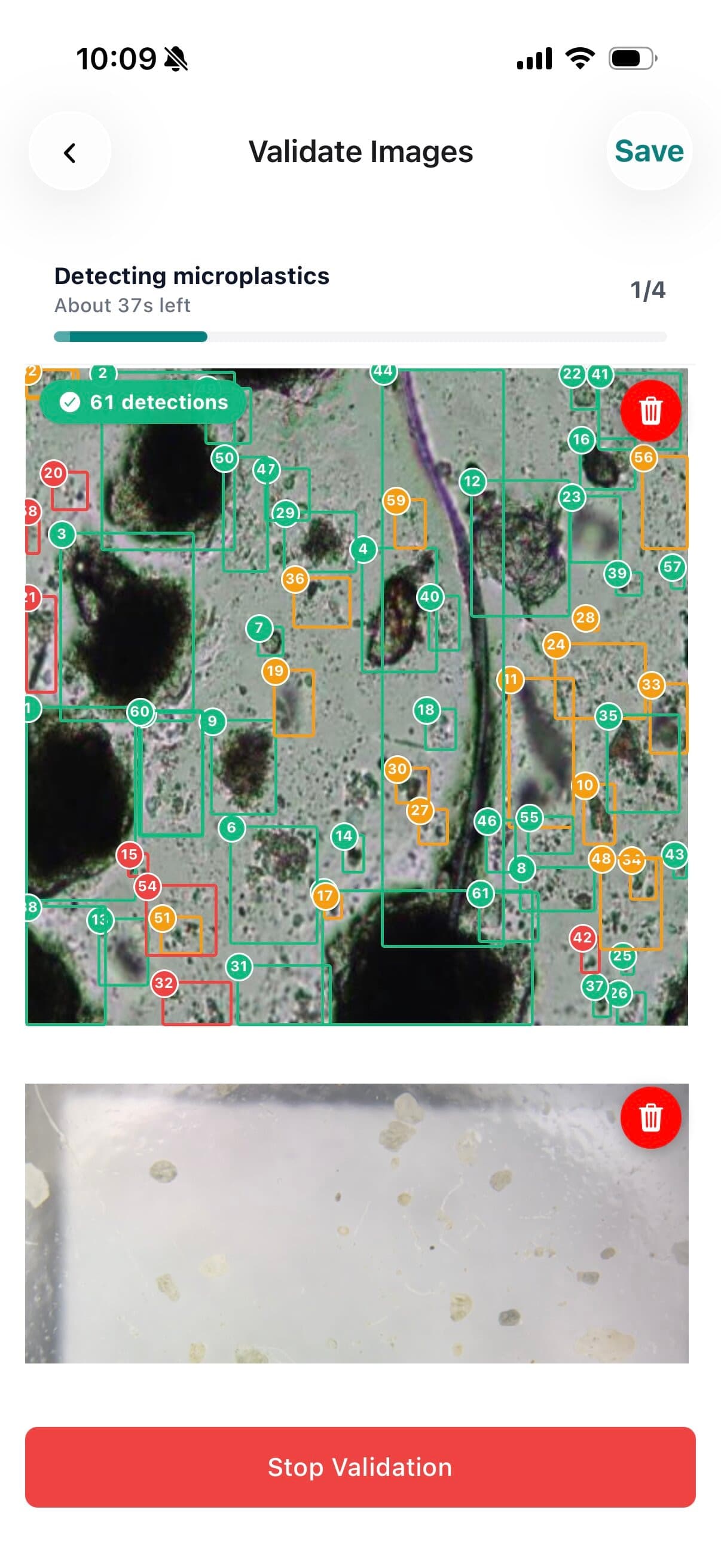
    Take up to 30 photos with the camera, or pick existing ones from your library. CSI Ocean sends them to its detection model and marks every suspected microplastic particle with a numbered bounding box and a confidence band: green for high, amber for medium, red for low.

    check_smallUp to 30 photos · Bounding boxes · Confidence bands
    CSI Ocean observation detail — bounding-box detections on a snow sample with observer, sample type, and location
  3. 03Step 03 · Record

    Capture the conditions

    Depth, water type, environment, sample volume, equipment, filter pore size, contamination protocol, weather, time of day. Only the fields relevant to your sample type. A skip-advanced option keeps it light when you are starting out, or fill it all in for research-grade entries.

    check_smallAdaptive wizard · Cached vocabularies · Skip advanced
  4. 04Step 04 · locate

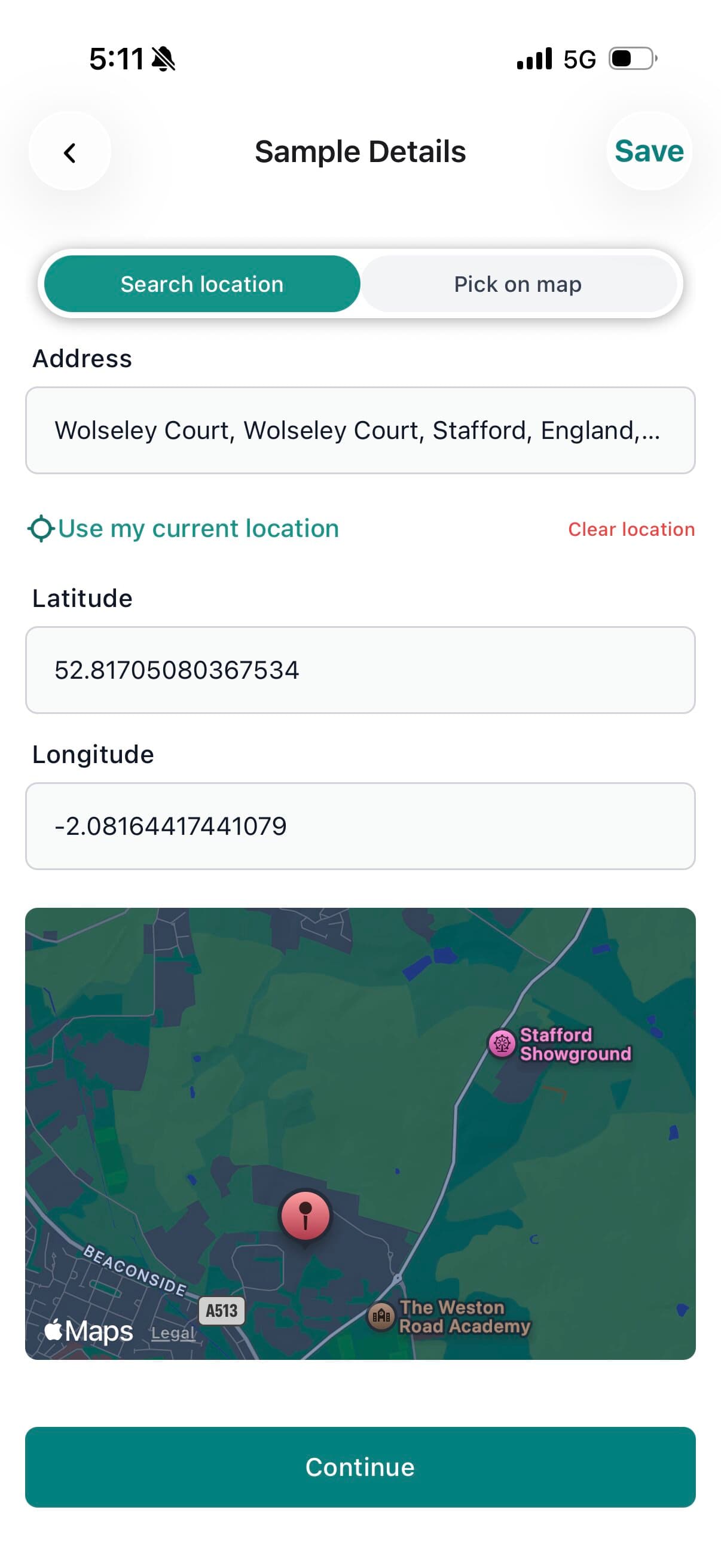
    Pin it on the map

    Tap your location, drop a pin, or enter coordinates manually. The app reverse-geocodes a human-readable address. Offline? No problem. The observation queues locally and syncs the moment you reconnect.

    check_smallGPS · Manual coords · Reverse geocode · Offline queue
    CSI Ocean explore map with heatmap layer over Western Europe
  5. 05Step 05 · Share

    Submit, share, and explore

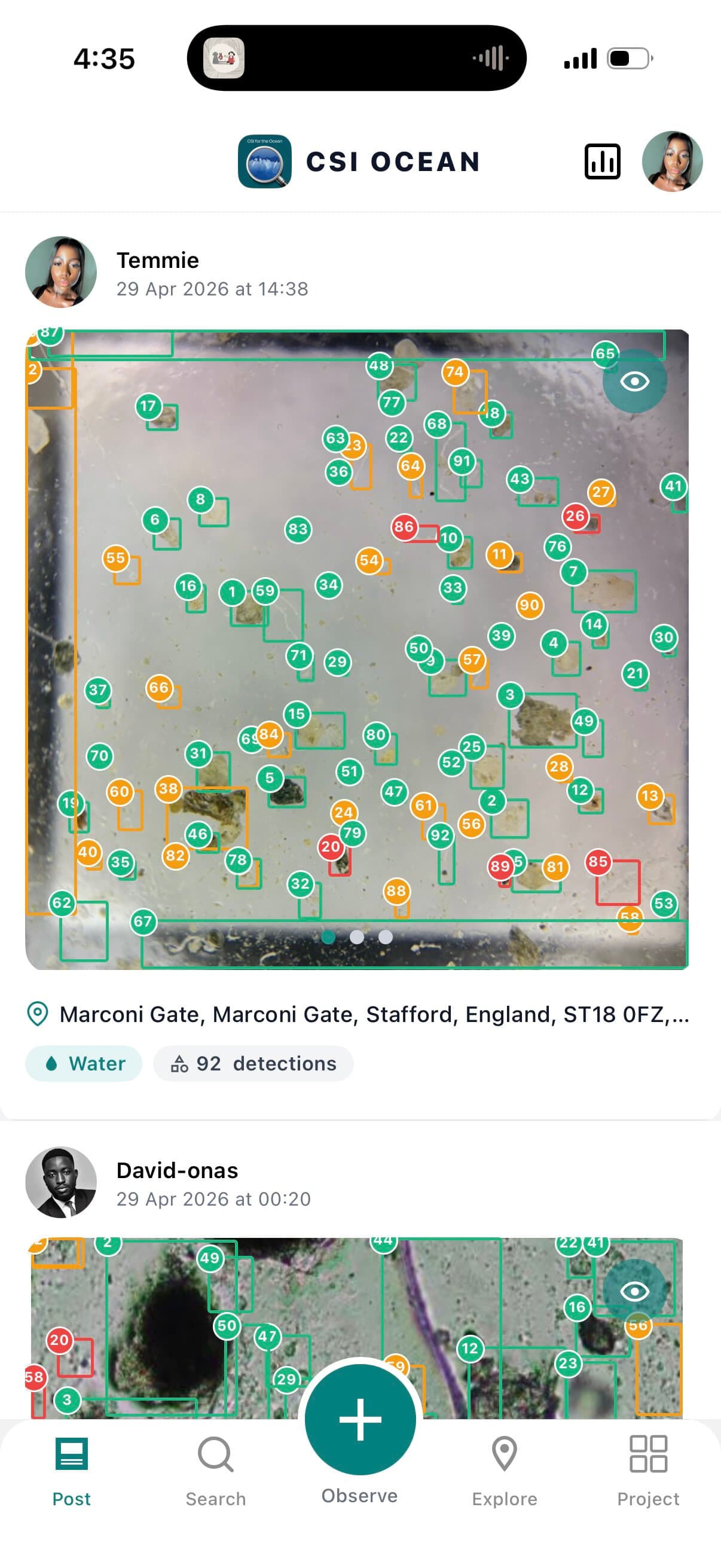
    Your observation lands in the global feed and on the explore map. Browse what others are reporting. Filter by sample type. Switch from clustered pins to a heatmap. Tap any observation to see the full breakdown, including detections drawn directly on the photos. Export a polished PDF for your field journal.

    check_smallGlobal feed · Filters · PDF export
    CSI Ocean posts feed with sample observations
VFeatures

Built around the science,
not the other way round.

Eight feature groups that reflect how the app is actually built, from the wizard down to the secure session. Skim the headlines, or open the bullets when you want the detail.

  • photo_camera
    01 / 08

    Capture and detection

    A multi-step wizard that adapts to the sample type, machine-learning detection on every photo, and per-image validation status.

    • Adaptive wizard for water, air, snow
    • Up to 30 photos per observation
    • Numbered detection chips with confidence bands
    • Pause, resume, retry on individual frames
    Photos per obs.30
  • map
    02 / 08

    The global map and feed

    A clustered pin map and animated heatmap layer, with filters by sample type and time window, plus a posts feed and global search.

    • Google Maps with smooth zoom and tap-to-expand clusters
    • Animated heatmap rendered with native graphics
    • Filter by sample type (Water, Air, Snow, All)
    • Filter by time window (recent, 30, 90, all time)
  • preview
    03 / 08

    Observation detail

    A three-tab detail view (Information, Detected, Data Quality), pinch-zoom on bounding boxes, inline location card, and a polished PDF export.

    • Three-tab detail (Info · Detected · Data Quality)
    • Pinch focus on individual detections
    • Inline location card with map preview
    • PDF export with cover page and per-image annotations
    One-tap exportPDF
  • groups
    04 / 08

    Projects and community

    Public projects anyone can create or follow, project-scoped observations, leaderboards, and a member directory with follow and unfollow.

    • Joined and Discover tabs
    • Project profiles with member count and contribution history
    • Global leaderboard with gold, silver, bronze recognition
    • Haptic feedback on follow and unfollow
  • lock
    05 / 08

    Account and onboarding

    Email-based signup with explicit consent, six-digit verification, secure password handling, and persistent session in the device secure enclave.

    • Six-digit one-time verification code
    • Hashed passwords, never seen by the device
    • Public username, optional avatar
    • Persistent session via iOS Keychain or Android Keystore
  • wifi_off
    06 / 08

    Offline support

    Offline-first capture with status badges, cached scientific vocabularies, and resilient sync when connectivity returns.

    • Local save with pending, processing, synced, failed states
    • Cached lookups for sample types and equipment
    • Map and feed cache for instant cold launches
    • Resumes uploads automatically when back online
    Wizard offline100%
  • verified
    07 / 08

    Quality and trust

    Standardised vocabularies prefetched from the server, data-quality tags, detection confidence bands, and soft-delete on the server.

    • Sample types · Environments · Equipment · Filter pore sizes · Contamination protocols
    • Data Quality tag (Casual · Needs ID · Research)
    • Per-particle confidence band visible at a glance
    • Soft-delete preserves recoverability
  • shield
    08 / 08

    Security and privacy by design

    No third-party analytics, no crash-reporting SDK, no ad identifiers, no push notifications, no background location. The app talks to its own backend and to a hosted detection endpoint.

    • TLS in transit for every request
    • Bearer-token auth with seven-day lifetime and refresh
    • Tokens stored in the device secure enclave
    • Soft-delete with administrator-recoverable retention
VIWhy CSI Ocean stands out

Six commitments
we keep on every release.

  1. 01Methodology-first

    Designed by the methodology, not the other way around.

    The wizard codifies how a microplastics researcher would walk through the work, sample, environment, equipment, protocol, location, so volunteer observations end up structured the way labs need them.

  2. 02Open dataset

    Open by default.

    Every observation in the public dataset is browsable, searchable, and pinnable on a global map. There is no paid tier and no premium dataset.

  3. 03Real-time inference

    Detection in seconds, not days.

    Photos are sent to a hosted machine-learning endpoint that returns annotated detections in seconds. You see suspected particles right there in the wizard.

  4. 04Field-grade

    Built for the field.

    Offline capture, cached vocabularies, and resilient sync mean the app works on a boat, in a forest, or under a snowfall, just as well as in a lab.

  5. 05Quiet by design

    No analytics. No ads. No tracking.

    No third-party analytics SDK is integrated. No advertising network is loaded. The app talks to its own backend and to a hosted detection endpoint, and that is it.

  6. 06Polished and accessible

    Native components, accessible defaults.

    Built with native iOS components and Material guidelines, with text contrast checked against WCAG AA at body sizes. Uses haptics, share sheets, and link previews to feel like a first-class platform citizen.

From the scientific advisory board
“Citizen science only matters if the data lands in a form labs can use. CSI Ocean encodes the protocol so contributions come back structured, geo-referenced, and ready to compare across sites. That is rare.”
[Pending] Scientific lead, partner institution
VIIThe global map

Every observation on one map.

Switch from clustered pins to a heatmap. Filter by sample type. Tap a pin to read the full observation, including detections drawn on the photos. The cinematic below is rendered programmatically with Remotion to give you a feel for the live screen.

5 sample observations · powered by Google Maps in-app

Sample data shown. The live feed connects when the public dataset ships.

VIIISecurity and privacy

The scientific record is public.
Your personal information is not.

Here is exactly what the app collects, what it does not, and how we protect your account. We treat the scientific record as a public good.

01 / Stored

What we store

Account fields, plus the scientific metadata of every observation you submit.

For your account
  • Email, for sign-in and password reset
  • Name, shown on your profile and the leaderboard
  • Password, hashed on the server, never stored in plain text
  • Username, public on the leaderboard and observation feed
  • Avatar, optional
  • Phone number and date of birth, optional
  • User type chosen at signup
For each observation
  • Photos, uploaded to the project's secure cloud storage
  • Location as latitude and longitude, plus optional reverse-geocoded address
  • Sample metadata: type, depth, volume, environment, equipment, weather, contamination protocol
  • Detection results: bounding boxes and confidence scores
02 / Not collected

What we do not

The list of things this app deliberately does not include.

  • blockNo third-party analytics. No Google Analytics, Mixpanel, Segment, Amplitude, or similar SDK.
  • blockNo crash-reporting service. No Sentry or comparable telemetry.
  • blockNo advertising identifiers. The app does not request IDFA or GAID.
  • blockNo push notifications. The app does not request a push token.
  • blockNo on-device location tracking. Location is read only when you tap the location step.
  • blockNo SMS by default. Email verification is the default for password reset.
03 / Protections

How we protect your account

Five concrete protections that are in place today.

  • verified_user
    Email-verification on signup
    Six-digit one-time code, expires after five minutes.
  • key
    Bearer-token authentication
    Seven-day token lifetime with a refresh endpoint.
  • lock
    Tokens in the device secure enclave
    iOS Keychain or Android Keystore via Expo SecureStore.
  • https
    TLS in transit
    Every request to the API and the detection endpoint.
  • history
    Soft-delete on the server
    Recoverable by an administrator within the retention window.
IXFrequently asked questions

Honest answers,
no marketing-speak.

  • Yes. There is no paid tier, no premium dataset, and no advertising. The project is funded by a research programme so the app can stay free for the people doing the work.

  • No. The capture wizard is designed for first-time observers. You'll be guided through every step, with optional advanced fields you can skip until you want them. If you have scientific training, the metadata is rich enough for research-grade observations.

  • The detection model flags suspected microplastic particles and assigns a confidence band: high, medium, or low. It is intended as a screening aid, not a substitute for laboratory confirmation. Researchers can filter by confidence and by data-quality tag (Casual, Needs ID, Research).

  • Yes. The full capture wizard works offline. Observations queue locally with a visible status indicator and sync automatically when you reconnect. Every scientific lookup the wizard needs (sample types, environments, equipment, contamination protocols) is cached on first launch.

  • Photos are uploaded to the project's secure cloud storage and stored privately. They appear in the public dataset attached to your observation, with detection bounding boxes drawn over them. If you delete the observation, the photos are removed from public view.

  • You can export individual observations as polished PDFs from the observation detail screen, including cover page, metadata, and image pages with detection overlays.

  • By default, every approved observation appears in the public feed and on the explore map. Your username, sample photo, location, sample type, and detection count are public. Your private profile fields (email, phone, date of birth) are not.

  • Yes. Citation block (DOI, project lead, institution, suggested citation format) will be published with the open-data release.

  • Not yet. The app currently ships in English only. Additional locales are on the roadmap.

  • Email support and we'll process the deletion. Your account record and personal fields are removed; observations may remain in the public dataset in anonymised form, depending on the project's data-retention policy.

  • Use the in-app feedback form, or email the support address.

  • Observation media is stored on Amazon S3. Database records are stored on the project's primary cloud-hosted database.

  • Partner agencies and academic institutions will be listed once collaborations are confirmed.

  • Researchers and the scientific advisory team review samples flagged for follow-up. Model updates are versioned, and every observation records the detection model version used at capture.

Still have a question? Email the team: see the contact details in the footer below.

Free, on iOS and Android

Get CSI Ocean.
Submit your first observation today.

Free on iOS and Android. Twenty minutes from a curious walk to a peer-reviewable record. Every observation contributes to a shared scientific dataset.

No ads · No tracking · No premium tier